The Biggest Differences Between Mac and PC Diagnostics and Repair

Why RAM Prices Shot Up in 2025 — And What to Expect in 2026
December 10, 2025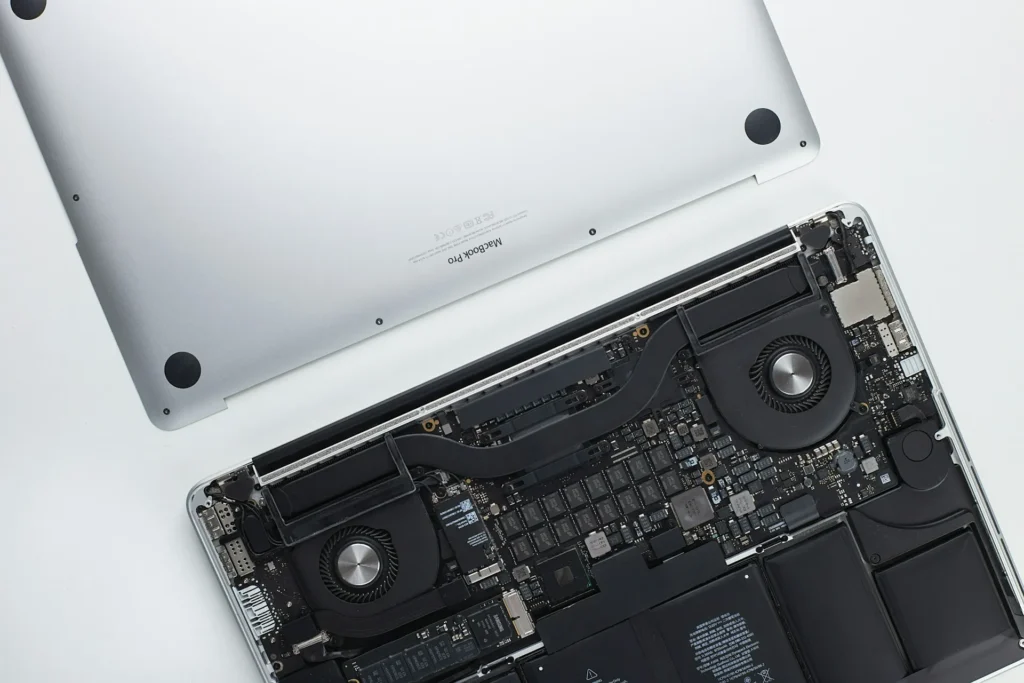
When something breaks on a computer, most people just want one thing: a fast, trustworthy fix that doesn’t cost a fortune. But under the hood, diagnosing and repairing a Mac can look very different from diagnosing and repairing a Windows PC—sometimes because of engineering choices, sometimes because of ecosystem rules, and often because Apple and the broader PC industry have very different ideas about how repair should work.
This article breaks down the major differences in how Mac and PC repair is approached, from hardware diagnostics and software troubleshooting to tools, workflows, parts availability, warranties, and realistic cost/turnaround expectations.
1) Hardware Architecture: Standardization vs. Controlled Design
PCs are a spectrum. “PC” can mean everything from a DIY desktop assembled from retail parts to a tightly engineered business laptop. That diversity is a blessing for upgrades and component swaps, but it also means diagnostics can require more detective work: different chipsets, different BIOS/UEFI behaviors, different thermal designs, and wildly different part quality.
Macs are far more uniform—by design. Apple controls the hardware stack, and the internal layout is typically consistent within model generations. That often makes the “known issues” and repair playbooks more predictable. The trade-off is that many components are more integrated. Over time, Apple has moved toward soldered storage, soldered RAM (in many models), and tighter part pairing. Uniformity helps reliability and performance, but it changes the repair game: fewer upgrades, more board-level work, and more reliance on precise part compatibility.
Practical impact:
- On many PCs, a failed SSD or RAM stick can be swapped quickly.
- On many Macs (especially modern ones), the same failure might mean deeper board-level diagnostics or a more specialized repair route.
2) Hardware Diagnostics: Modular Testing vs. System-Level Validation
PC hardware diagnostics often start with isolation
A classic PC diagnostic flow is about removing variables:
- Test RAM sticks one at a time (MemTest-style logic).
- Swap in a known-good PSU on desktops.
- Try another SSD or boot from a USB drive.
- Use motherboard beep codes, debug LEDs, or POST cards.
- Check BIOS event logs and sensor readouts.
Because PCs frequently use standardized parts, technicians can rapidly confirm whether a component is at fault by substitution.
Mac hardware diagnostics lean toward integrated failure patterns
Mac repair often begins with:
- Checking power rails, charging behavior, and thermal conditions.
- Verifying sensor inputs and SMC-related behavior (on older Intel Macs).
- Running Apple-specific diagnostic routines (or service-level tests where available).
- Looking for common board-level failures on known model families (power management ICs, backlight circuits, USB-C controller issues, etc.).
Since Apple systems are more integrated, “swap the part” is not always possible. Many Mac failures manifest as system-level symptoms—random shutdowns, no power, intermittent charging, kernel panics—that require a narrower, Apple-informed diagnostic lens.
Practical impact:
- PC diagnosis is often faster for “plug-and-play” component failures.
- Mac diagnosis can be faster for known model-specific faults—but may demand more specialized equipment and expertise when the issue is on the logic board.
3) Software Troubleshooting: Open Ecosystem vs. Curated Platform
Windows: More variables, more possibilities
Windows runs on an enormous variety of hardware and driver stacks. A repair technician’s toolkit typically includes:
- Event Viewer and Reliability Monitor for crash patterns.
- Device Manager and driver rollback strategies.
- DISM/SFC scans and component store repair.
- Malware and PUP cleanup (still a major category of PC “repair”).
- BCD/boot repair tools and recovery environment workflows.
- Vendor utilities (Dell/HP/Lenovo diagnostics, BIOS updaters).
A big portion of PC troubleshooting is driver conflict, Windows update issues, third-party antivirus trouble, or hardware+driver interactions. Windows is powerful, but it’s a busy intersection with lots of traffic.
macOS: More consistent, but not immune
macOS benefits from Apple controlling the hardware set, so driver chaos is less common. But Mac troubleshooting has its own recurring themes:
- Startup items/launch agents causing slowdowns.
- Permissions, privacy/security settings, and background services.
- iCloud sync conflicts, Photos library issues, and storage “Other/System Data” confusion.
- Kernel panics (less frequent than Windows BSODs for many users, but sometimes trickier to interpret).
- OS compatibility constraints for older apps and peripherals.
macOS can feel “cleaner” to troubleshoot because of fewer drivers and a consistent baseline, but when something does go wrong, it may be tied to platform-level services (security, notarization, system integrity features) that require a different playbook than Windows.
Practical impact:
- Windows repair often involves broader system hygiene plus driver/OS repair.
- macOS repair often involves targeted fixes with fewer variables—until security/system protections or hardware pairing become relevant.
4) Repair Workflows: Replace-and-Upgrade vs. Repair-and-Validate
PC workflow trends
PC repair workflows often follow a modular logic:
- Confirm fault via symptom + isolation tests.
- Replace the failed part (RAM, SSD, battery, keyboard, screen, fan).
- Update BIOS/firmware/drivers as needed.
- Validate thermals and stability.
- Offer upgrade paths while you’re in there (bigger SSD, more RAM, better cooling).
Because upgrades are often feasible, PC repair is frequently combined with performance improvements.
Mac workflow trends
Mac repair workflows more often emphasize:
- Confirm fault using Apple-aware symptom patterns (power/charging, sensors, board-level signals).
- Repair or replace assemblies (display, top case, battery) where modular.
- For deeper issues, perform board-level repair (micro-soldering, component replacement) when appropriate.
- Validate using Apple-relevant checks and user workflow testing (sleep/wake, power states, charging behavior, ports, display backlight).
- Ensure data integrity—many Mac users have strong expectations around preserving data and system continuity.
Because upgrades may be limited, Mac repairs tend to be more strictly “restore function and reliability” rather than “repair plus upgrade.”
5) Tools and Equipment: Common vs. Specialized
Common tools in both worlds
- ESD protection, precision drivers, thermal paste, ultrasonic cleaning (select cases)
- USB boot media, backup tools, data recovery utilities
- Imaging and cloning tools for drive migration
- Basic electrical tools: multimeter, thermal camera (in higher-end shops)
PC-leaning tools
- POST cards, BIOS flashing tools, RAM test utilities
- Wide variety of vendor diagnostics suites
- Standardized component testers and swap stock
Mac-leaning tools
- Micro-soldering stations, microscopes, hot air rework
- Board schematics/boardview resources (where legitimately available)
- USB-C power meters and charging diagnostics
- Specialized screen adhesive tools and opening methods (for certain iMac/MacBook designs)
Bottom line: PC repair shops can do a lot with standardized parts and swap testing. Mac-capable shops often need that plus finer electronics capability, especially for modern MacBooks.
6) Common Failures: Different Patterns, Different Root Causes
Common PC failures
- Malware/cleanup-related slowdowns and instability
- Failing HDD/SSD, corrupted boot records
- Overheating from dust and dried thermal paste (especially gaming laptops)
- Hinges, chargers, DC jacks, keyboard wear
- RAM instability and driver conflicts
- Power supply failures (desktops)
Common Mac failures
- Battery swelling and trackpad click issues (historically common in certain models)
- Display cable/backlight issues (model-dependent)
- Liquid damage causing logic board failures
- USB-C charging/port controller issues (some generations)
- Storage constraints causing system slowdown (especially when nearly full)
- Keyboard/trackpad assembly issues in certain historical model lines
Some failures overlap—batteries wear out everywhere—but the way they present and the repair options available can differ a lot.
7) Ecosystem Differences: Freedom vs. Integration
Windows PCs generally operate in a more open ecosystem:
- More third-party parts and aftermarket repair options
- Greater compatibility with peripherals and niche software
- More variability in quality between manufacturers
Macs emphasize integration:
- Tight linkage with iPhone/iPad, iCloud, AirDrop, Messages/FaceTime
- Consistent hardware/software experience
- Higher likelihood that a repair must preserve “Apple continuity” features (secure boot, device authentication, system integrity)
A hidden diagnostic difference: On Macs, user complaints often involve “ecosystem breakage” (iCloud sync weirdness, continuity features failing, system services acting up). On PCs, user complaints often involve “environment breakage” (drivers, Windows updates, third-party apps, malware).
8) Security and Software Environment: Cleanup vs. Compliance
Windows security troubleshooting frequently includes:
- Malware scanning and removal
- Browser hijackers and adware cleanup
- Credential compromise response steps
- OS repair commands and registry-level cleanup (when necessary)
macOS security troubleshooting often includes:
- Understanding Gatekeeper, notarization, and permissions
- Resolving blocked extensions or system extensions
- Managing privacy/security controls that affect app behavior
- Navigating System Integrity Protection (SIP) boundaries
Windows issues are more often about removing bad actors and repairing system components. macOS issues are more often about configuring and reconciling security boundaries—especially in managed or professional environments.
9) Parts Availability and Repairability: Abundance vs. Constraints
PC parts are generally easier to source:
- Many compatible substitutes exist (especially for SSDs, RAM, batteries)
- Aftermarket screens and keyboards are widely available
- Used/refurbished component markets are strong
Mac parts can be more constrained:
- Some parts are readily available; others are limited or model-specific
- Newer designs may involve pairing/validation constraints
- Assemblies (like top cases) can be expensive compared to a single replaceable part in a PC
This influences both cost and turnaround time.
10) Warranty and Service Programs: Different Rules of the Road
PC warranty experiences vary widely by manufacturer, region, and device tier. Business-class devices often have excellent service options; consumer models can be less predictable. Independent repair is usually straightforward, and warranties don’t always enforce the same degree of parts validation.
Apple’s service ecosystem is more structured. AppleCare and authorized service programs have clear pathways, but they can also come with stricter procedures. For users, this can mean a more consistent experience—yet sometimes fewer repair choices depending on the issue and the model.
11) Cost and Turnaround: What You Can Realistically Expect
PCs: Often cheaper and faster for common faults
Because components are modular and abundant, many PC repairs are:
- Quick (same-day or next-day for common parts)
- Cost-effective (competitive parts pricing, multiple sourcing options)
- Upgrade-friendly (repair can double as a performance boost)
Macs: Can be fast for modular jobs, but expensive for integrated ones
Mac repairs can be very fast when the job is straightforward (battery, certain displays, ports on some models). But integrated designs and part constraints can push:
- Higher parts cost
- Longer sourcing times for specific assemblies
- More labor for board-level troubleshooting and micro-soldering
Rule of thumb:
- If the failing component is modular, Macs and PCs can be comparable.
- If the failing component is integrated, Macs often become more specialized—and potentially more expensive.
12) User Expectations: Different “Pain Points”
PC users often expect:
- Flexibility and upgrade options
- Strong performance per dollar
- A “fix it and let me customize it” mindset
Mac users often expect:
- Data preservation and seamless continuity
- A return to “it just works” stability
- Repairs that preserve the Apple experience (battery health reporting, trackpad feel, display quality, sleep/wake reliability)
A good technician adjusts their process to match those expectations—because a repair that technically works can still disappoint if it doesn’t align with how the user relies on the system.
Final Thoughts: The Best Repair Approach Depends on the Platform—and the Problem
Mac and PC diagnostics share the same fundamentals: observe symptoms, isolate variables, verify root cause, repair reliably, and validate thoroughly. The biggest difference is how each ecosystem enables those steps.
PC repair tends to shine with modularity, easy part swaps, and upgrade-friendly workflows. Mac repair tends to demand stronger model-specific expertise, tighter validation, and—in many cases—more advanced board-level capability. Neither is inherently “better,” but they are different enough that experience matters.
If you’re looking for technicians who understand both worlds—not just the operating systems, but the realities of parts sourcing, repair workflows, and long-term reliability—EagleTech are experienced Mac and Apple repair technicians with deep expertise across both Mac and PC systems, helping users troubleshoot accurately and repair confidently.